
Adding a Web UI to My PDF to Markdown Converter
The Promise I Made to Myself
In my last post about building the PDF to Markdown converter , I listed some “what’s next” ideas at the end. One of them was:
FastAPI wrapper: Create an HTTP API for web apps to use
Well, I did it. And I went a step further — I built a full drag-and-drop web UI on top of it.
The CLI still works exactly as before. This is an addition, not a replacement. But now when I want to convert a batch of PDFs without thinking about terminal commands, I just open a browser tab.
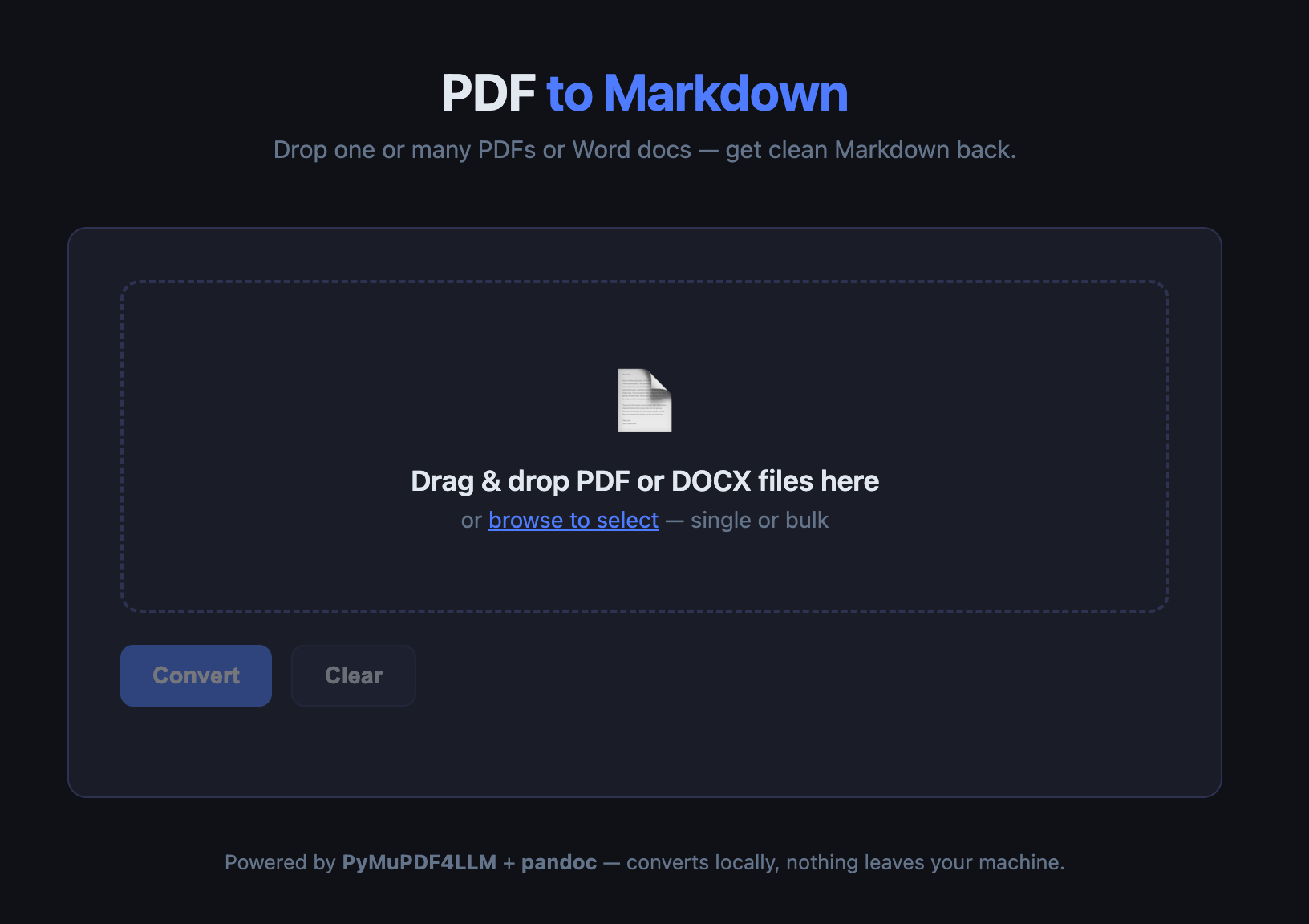
What the UI Does
The interface is intentionally minimal:
- Drag-and-drop zone — drop one PDF or fifty onto it
- Browse button — if you prefer clicking
- Convert button — kicks off the conversion
- Per-file progress bars — live updates as each file converts
- Individual download — each completed file gets its own Download button
- Download all as ZIP — one click to grab everything
- Clear — resets the session and cleans up temp files server-side
Everything runs locally. Files go to a temp directory on your machine, get converted, and are served back to you. Nothing hits an external API.
The Stack
I kept it as simple as possible:
Backend: FastAPI + uvicorn
FastAPI was the obvious choice — it handles file uploads cleanly, has first-class async support, and the python-multipart library makes multi-file form handling trivial. The conversion logic is unchanged from the CLI: pymupdf4llm.to_markdown() doing the heavy lifting.
Progress updates: Server-Sent Events (SSE)
This is the part I found most interesting. When you hit Convert, the browser opens a persistent connection to /progress/{job_id} and receives a stream of JSON events — one every 400ms — until the job finishes. No polling loop, no WebSocket complexity. SSE is perfect for this: unidirectional, simple, and built into every modern browser.
async def event_stream():
    while True:
        data = json.dumps({"progress": job["progress"], "done": job["done"]})
        yield f"data: {data}\n\n"
        if job["done"]:
            break
        await asyncio.sleep(0.4)

return StreamingResponse(event_stream(), media_type="text/event-stream")
On the frontend, consuming it is three lines:
const eventSource = new EventSource(`/progress/${jobId}`);
eventSource.onmessage = e => {
    const { progress, done } = JSON.parse(e.data);
    // update the UI...
};
Threading: The conversion itself is synchronous (PyMuPDF4LLM blocks while it processes pages). To keep the FastAPI event loop from freezing during conversion, each job runs in a ThreadPoolExecutor:
asyncio.get_event_loop().run_in_executor(executor, _convert_job, job_id, job_dir)
Four workers by default — enough to handle several simultaneous conversions without overloading the machine.
Frontend: Vanilla JS, no build step
I deliberately avoided React, Vue, or any framework. The whole UI is a single static/index.html file. It loads instantly, has no dependencies to install, and is easy to read and modify. For a local tool that one person uses, this is the right call.
Project Structure
Here’s what changed from the original CLI project:
pdf-to-markdown/
  pdf2md          — original CLI (unchanged)
  app.py          — FastAPI server (new)
  static/
    index.html    — drag-drop UI (new)
  serve           — start script (new)
  requirements.txt — updated with FastAPI deps
  venv/           — existing venv, three new packages added
The serve script is just:
#!/usr/bin/env bash
cd "$(dirname "$0")"
source venv/bin/activate
uvicorn app:app --host 0.0.0.0 --port 8765 --reload
Run it once, open http://localhost:8765, and you have a working converter in your browser.
One Gotcha: PyMuPDF4LLM is Synchronous
This tripped me up briefly. pymupdf4llm.to_markdown() does not return a coroutine — it’s a blocking call that can take 10–30 seconds on a large document. If you call it directly in an async FastAPI route handler, you freeze the entire event loop while it runs. No other requests get handled. The SSE stream stops updating.
The fix is the ThreadPoolExecutor pattern above — push the blocking work off the event loop entirely. The async route returns immediately, the SSE stream keeps ticking, and the conversion runs in a thread pool where it belongs.
The Download Endpoints
Three endpoints handle output:
GET /download/{job_id}/{filename}    — single .md file
GET /download-all/{job_id}           — all .md files as a ZIP
DELETE /job/{job_id}                 — clean up temp files
The ZIP is built in memory using Python’s zipfile module and streamed directly to the browser — no intermediate file on disk:
buf = io.BytesIO()
with zipfile.ZipFile(buf, "w", zipfile.ZIP_DEFLATED) as zf:
    for f in md_files:
        zf.write(f, f.name)
buf.seek(0)
return StreamingResponse(buf, media_type="application/zip", ...)
What This Unlocks
The CLI was already useful. The web UI adds a few things the CLI cannot easily do:
Non-terminal users. Anyone on my network can now use this converter by visiting http://my-machine:8765. No Python knowledge required.
Bulk drop workflows. Dragging 20 PDFs from Finder into a browser window and clicking Convert is significantly faster than constructing a --batch command with the right paths.
Visual feedback. The progress bars are not just cosmetic. For large PDFs that take 20–30 seconds, knowing the conversion is running (and roughly how far along it is) removes the anxiety of staring at a terminal cursor.
What’s Next
The original roadmap item was “FastAPI wrapper.” That’s done. The next one I’m eyeing:
Auto-feed to Obsidian inbox. Right now the flow is: convert in the web UI, download the ZIP, unzip, move to Obsidian. I’d like to add a toggle: “Send output directly to ~/projects/obsidian-vault/00-inbox/” — one less manual step.
That’s a small addition to the backend. Coming soon.
Running It
cd ~/projects/pdf-to-markdown
./serve
# Open http://localhost:8765
The first run installs nothing new — the three new packages (fastapi, uvicorn, python-multipart) are already in the venv. It just works.