RAG, Agents, and Skills: The Three Pillars Inside My Personal AI
RAG, Agents, and Skills: The Three Pillars Inside My Personal AI⌗
This site — Augmented Resilience — didn’t get built the way most blogs do. There was no staring at blank Hugo config files, no manually hunting down Namecheap SSH docs, no scrambling to remember whether the deploy script needed the public/ folder cleaned before each build.
Instead, I described what I wanted. The AI knew my hosting setup (Namecheap shared hosting), my stack (Hugo with the re-terminal theme), my repo (GitHub, SSH-keyed), and my editor (Obsidian). When a build error surfaced — a theme name mismatch between hugo.toml and the actual directory — it was diagnosed and fixed before I had time to Google it. When the deploy script needed writing, it was scaffolded against my specific environment. When I accidentally left sensitive data in an early draft, it caught it before the commit.
None of that context lived in the prompt. It lived in the infrastructure.
The system behind it is called PAI (Personal AI Infrastructure) — an open-source framework I run locally on top of Claude Code. And the reason it could handle an entire site build end-to-end without constant hand-holding comes down to three architectural pillars: RAG, Agents, and Skills.
What Is PAI?⌗
PAI is an open-source personal AI infrastructure system that runs on top of Claude Code. It’s not a SaaS product — it’s a framework you install on your own machine. The system is built around a central idea: AI systems need structure to be reliable. Like scaffolding supports construction, PAI provides the architectural patterns that make AI assistance consistent, contextual, and capable of compounding over time.
There are 34 skills installed on my system, 17 event hooks, 141 workflows, and a memory system that learns from every interaction. But none of that would matter without three core mechanisms working in concert.
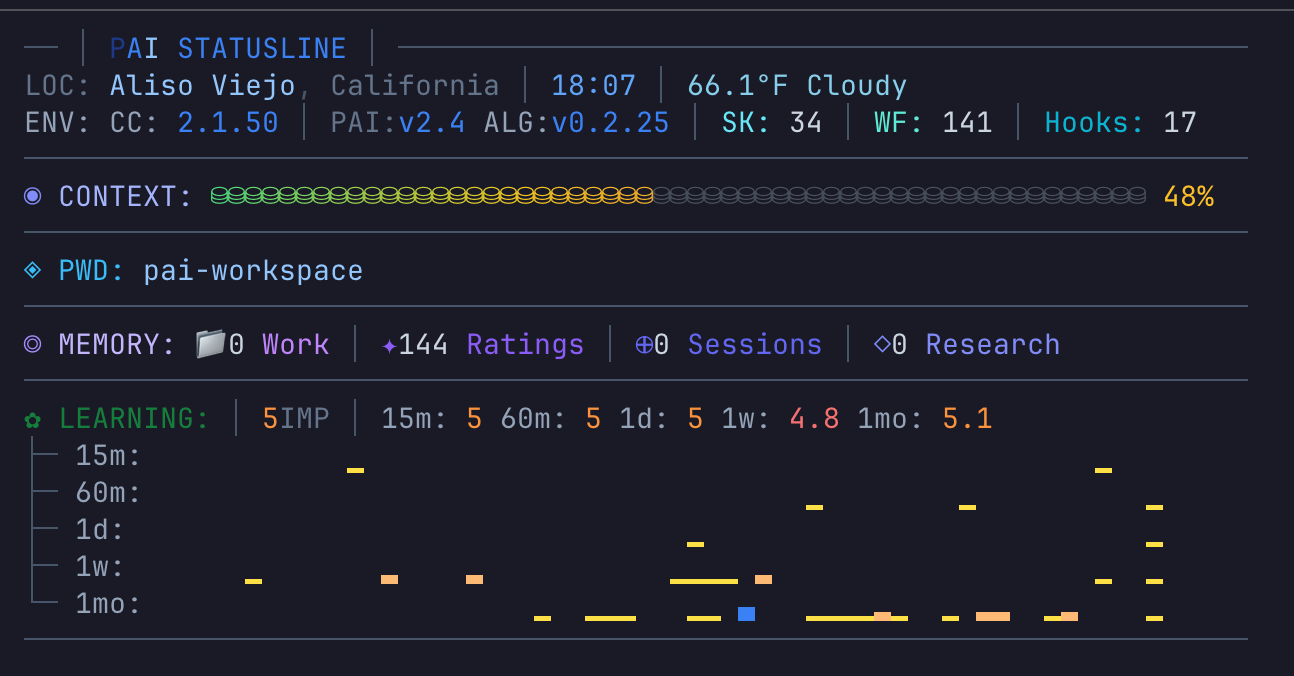 The PAI statusline — live system stats showing version (v2.4), algorithm (ALG:v0.2.25), skill count (SK: 34), workflows (WF: 141), hooks (17), context usage (48%), memory signals (144 ratings), and a rolling quality score trend.
Pillar 1: RAG — Your Personal Knowledge Base In Every Response⌗
RAG (Retrieval-Augmented Generation) is the pattern of retrieving relevant documents from a knowledge store and augmenting the AI’s prompt with that context before generating a response. In enterprise AI, this is how you get a chatbot that can answer questions about your internal policies without hallucinating.
In PAI, RAG is the engine that makes the AI feel like it knows you.
How It Works in PAI⌗
When a session starts, PAI’s hook system loads a foundational context layer: my identity, my name, the current date, and the core behavioral rules (the Algorithm). This is the retrieval index — a lightweight map of everything the system knows how to find.
When I make a request, the system retrieves additional context on demand:
-
Skills frontmatter — Each of the 34 skills has a
descriptionfield with aUSE WHENclause. These descriptions load at startup as a routing index. When my request matches a skill’s intent, the full skill content loads. This is retrieval — pulling in the right expertise document for the task. -
USER/ context files — There’s a structured personal knowledge base living at
~/.claude/skills/PAI/USER/. It contains my resume, my TELOS life goals, my contacts, my projects, my tech stack preferences. When I ask a question where my professional background is relevant, that context gets retrieved and injected. -
MEMORY/ directory — Every session, every correction, every insight gets captured in a structured memory system organized into
WORK/,LEARNING/,SIGNALS/, andRESEARCH/directories. Past work items, completed tasks, and quality signals from previous interactions can all be retrieved to inform the current one. -
Hook-injected context — Event hooks fire at specific moments (session start, before each prompt, after tool use) and inject dynamic context — things like the current depth classification, relevant behavioral rules, or system state.
Practical Scenario: Building Augmented Resilience⌗
When I was setting up this site and ran into the Hugo theme mismatch error, here’s what PAI retrieved without me explaining any of it:
- My tech stack preferences from the USER context — Hugo, GitHub, Namecheap, Obsidian as editor
- The WebSavant skill loaded automatically (matched “Hugo site”, “deployment” intent), bringing with it Hugo-specific knowledge about theme configuration,
hugo.tomlstructure, and build pipelines - My project context from MEMORY — the repo name, the hosting environment, decisions made in prior sessions about the deploy workflow
By the time I described the error, PAI already knew the environment it was debugging. It didn’t need me to explain what kind of hosting I had, which theme I was using, or what my folder structure looked like. The retrieval layer had already assembled that context before a single word of the solution was written.
That’s the difference RAG makes — not smarter AI, but contextually equipped AI.
Pillar 2: Skills — Domain Expertise That Activates Itself⌗
If RAG is how PAI knows context, Skills are how PAI does work. A skill is a self-contained expertise module that activates automatically based on intent, routes to the right workflow, and executes a structured procedure.
Think of each skill as a senior specialist on call — and you never have to explicitly page them.
The Anatomy of a Skill⌗
Every skill follows the same structure:
SkillName/
├── SKILL.md          ← Routing layer (loads on invocation)
├── Workflows/        ← Step-by-step execution procedures
│   └── Create.md
│   └── Update.md
└── Tools/            ← CLI automation scripts (TypeScript)
    └── Generate.ts
The SKILL.md file has two parts:
- YAML frontmatter with a
USE WHENclause — this is how Claude Code knows when to activate the skill - Workflow routing table — once activated, this routes the request to the correct workflow file
The magic is in USE WHEN. Here’s a simplified example from the OracleHCM skill:
description: Expert Oracle HCM Cloud troubleshooting and guidance. USE WHEN user
  mentions Oracle HCM, HCM Cloud, HDL, HCM Data Loader, Journey, Checklist,
  workflow approvals, autocomplete rules, fast formulas, security profiles...
I never have to say “use the Oracle HCM skill.” I just describe my problem in natural language. The intent matching system routes it.
Practical Scenario: Configuring SEO and GEO for augmentedresilience.com⌗
Before the site went live, I needed proper SEO and GEO — Open Graph tags for social sharing, meta descriptions for search, canonical URLs, a sitemap, and schema.org structured data so AI-powered search engines like Perplexity, ChatGPT, and Claude could understand and cite the content accurately. None of that comes configured out of the box with the re-terminal theme. I said:
“Set up SEO and apply Generative Engine Optimization to augmentedresilience.com.”
The system:
- Activated the WebSavant skill (matched “SEO” + “GEO” + “site” intent — no skill named, no flags set)
- Routed to the SEO and AddSchema workflows inside that skill
- Created the correct Hugo partial override at
layouts/partials/extended_head.html— the exact injection point the re-terminal theme exposes without touching any theme files - Added the full Open Graph tag set (
og:title,og:description,og:image,og:url,og:type) wired to Hugo’s page variables - Injected schema.org JSON-LD for every page type:
WebSiteandPersonon the homepage,ArticleandBreadcrumbListon every post, andAboutPageon/about— giving AI crawlers a machine-readable knowledge graph of the site - Created
robots.txtexplicitly permitting GPTBot, ClaudeBot, PerplexityBot, and other AI crawlers — with the sitemap URL wired in - Configured
hugo.tomlfor canonical URL generation and enabled the built-in sitemap output
Without the skill, this is a day of Hugo documentation, schema.org spec-reading, and trial-and-error. With it, the full SEO and GEO stack was complete in a single pass — because the skill had already encoded where everything goes in Hugo’s directory structure, which schema types matter for which page contexts, and how to wire Hugo’s template variables into valid JSON-LD that AI search engines can actually parse.
The 34 Skills I Have Installed⌗
My current skill roster includes tools for Oracle HCM support, security recon, OSINT research, browser automation, art generation, document processing, code generation, red teaming, and more. Each one is a packaged capability that activates without friction.
The system is also designed to be extended — building a new skill means writing a SKILL.md with a USE WHEN clause, a workflow routing table, and the workflow files. The CreateSkill skill handles the scaffolding automatically.
Pillar 3: Agents — Parallel Specialized Brains⌗
Skills handle individual domain expertise. Agents handle scale and specialization when a task is too complex for a single pass or requires multiple perspectives simultaneously.
PAI has a three-tier agent system:
Tier 1: Task Tool Subagents (Internal Workhorses)⌗
These are pre-built specialist agents that skills and workflows invoke internally: Engineer, Architect, Explore, QATester, Pentester, ClaudeResearcher, GeminiResearcher, GrokResearcher, and others.
When I ask PAI to research something deeply, it doesn’t just run one search. It can fan out to multiple research agents simultaneously — Claude, Gemini, and Grok each investigating from different angles — then synthesize the results with a “spotcheck” agent that verifies consistency.
This is parallel processing that would take me hours of manual work, running in minutes.
Tier 2: Named Agents (Persistent Specialists)⌗
Named agents are recurring characters with rich backstories, persistent identities, and unique voices via ElevenLabs text-to-speech. They build relationship continuity across sessions.
My installed named agents include:
- Serena Blackwood — Architect. Long-term system design decisions.
- Marcus Webb — Engineer. Strategic technical leadership.
- Rook Blackburn — Pentester. Security testing with a distinct personality.
- Ava Sterling — Researcher (Claude). Strategic deep-dive analysis.
- Alex Rivera — Researcher (Gemini). Multi-perspective comprehensive analysis.
When Rook runs a security assessment, he doesn’t just return findings — he announces them in his own voice through my speakers. It sounds minor. It’s not. Distinct voices make it cognitively easier to understand who did what work and why you should trust it.
Tier 3: Custom Agents (On-Demand Compositions)⌗
For tasks that don’t fit a named agent, PAI can compose agents dynamically from trait combinations:
- Expertise traits:
security,legal,finance,medical,research,technical,creative - Personality traits:
skeptical,enthusiastic,analytical,contrarian,meticulous - Approach traits:
thorough,rapid,systematic,adversarial,synthesizing
Each unique trait combination maps to a different ElevenLabs voice. A security + adversarial agent gets Callum’s edgy voice. An analytical + meticulous agent gets Charlotte’s precise cadence.
The trait system means I can spin up a custom agent for any edge case without writing a new agent from scratch.
Practical Scenario: Pre-Launch Validation of Augmented Resilience⌗
Before pushing the first real commit to augmentedresilience.com, I wasn’t going to just cross my fingers and run deploy.py. I asked PAI to validate the site was actually ready. What happened next wasn’t a single check — it was a parallel review board.
PAI spawned three agents simultaneously:
- Rook Blackburn (Pentester) scanned the entire repo for credentials, API keys, and sensitive data I might have accidentally left in a config file or draft post — and announced his findings in his own voice through my speakers
- A QA agent opened the Hugo local preview, walked every page, verified links weren’t broken, images loaded, and the deploy pipeline produced a clean
public/build - A Researcher agent audited the site’s meta tags, Open Graph data, and
hugo.tomlsettings against SEO best practices for a new blog
A fourth spotcheck agent then reviewed all three outputs for conflicts — did Rook’s findings overlap with anything the QA agent flagged? Were there config issues that touched both SEO and security?
The result was a single consolidated pre-launch checklist. Two issues surfaced: a leftover draft post with personal notes still marked draft: false, and a missing og:image tag. Both fixed before the first visitor ever landed.
The site you’re reading right now went live clean because three agents checked it in parallel before I touched the deploy button. That’s the difference between asking a question and deploying intelligence.
When All Three Work Together⌗
The real power of PAI isn’t any single pillar — it’s the composition.
Here’s what happened when I needed to go from “Obsidian draft” to “live on augmentedresilience.com” without a manual process I’d eventually forget or skip.
RAG assembled the context before I described the problem. From MEMORY it already knew: Namecheap shared hosting doesn’t support native git pull — content has to be pushed via FTP through GitHub Actions. It knew the Obsidian vault was the content source, that images.py had to run before hugo to convert image links, and that Python was the right tool for the orchestration script. Not one of those constraints was in my prompt.
Skills handled the architecture. WebSavant recognized a Hugo deployment pipeline request and routed to a workflow already aware of the full delivery chain: sync posts from Obsidian → convert images → hugo build → git commit → git push → GitHub Actions → Namecheap FTP. It knew the sequence. It knew why each step had to happen in that order.
Agents built it. An Engineer agent wrote deploy.py — the script that runs the whole sequence in a single command. An Architect agent designed the GitHub Actions workflow that picks up after the push and handles the Namecheap delivery step automatically. Two agents, two distinct responsibilities, running the job that a solo developer would have spent an afternoon piecing together from Stack Overflow answers.
The result:
python3 deploy.py "Add new post"
That’s it. One command. Every post that has ever gone live on this site — including this one — passed through a pipeline that RAG, Skills, and Agents built together. It’s not running because I set it up manually. It’s running because three systems knew what the job required before I finished explaining it.
The Compounding Effect⌗
What makes this architecture meaningful over time isn’t any single interaction — it’s that the system gets better at helping you with every session.
The MEMORY system captures learnings. The SIGNALS directory tracks your implicit feedback. When something goes wrong, it logs the full context under LEARNING/FAILURES. When a workflow produces a 9-10 response, that signal is captured too. The system adjusts.
Generic AI starts fresh every time. PAI compounds.
I’m still early in this — the personal profile files still have template placeholders I haven’t filled in, and there are skills I’ve barely touched. But even at partial configuration, the system already thinks more like a senior colleague than a search engine.
That’s what RAG, Agents, and Skills make possible together: an AI that knows your context, activates the right expertise automatically, and scales parallel intelligence for complex work — all without you having to manage the machinery.